
Script in.
Video out.
A free AI video studio that runs on your own PC. Paste a script and OMNITUBE makes the finished YouTube video: narration, AI scenes and clips, music, captions, thumbnails, Shorts and dubbing.
Everything a faceless channel needs, in one app
No subscriptions and no upload limits. Everything runs on your graphics card with open-source models.
One click, full video
Voice, images, video clips, music, sound effects, captions and render, built one after another with live progress.
Natural narration
Human-like voices and voice cloning from a short sample. Characters can speak in their own voices.
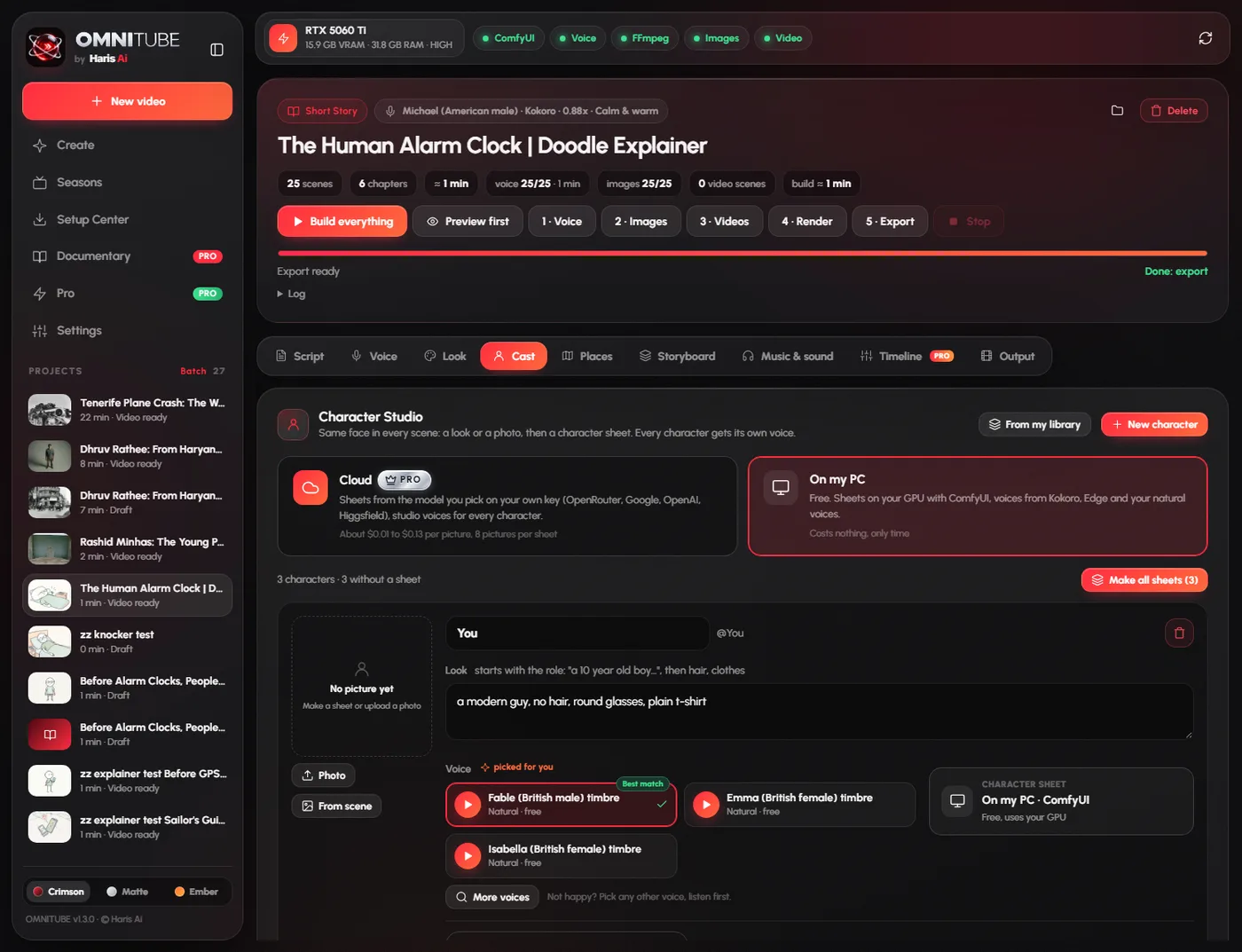
Characters that stay the same
Full-body reference sheets keep faces and clothes the same in every scene and every episode, found automatically.
Places that stay the same1.2
A scene sheet keeps the kitchen, classroom or street the same in every shot, inside and outside.
34 image styles1.2
Anime, Ghibli-like hand-painted, 3D, cartoon, oil painting, stick doodles, horror and more, each with its own preview.
Real motion
Turns scene images into short AI video clips with Wan 2.2, so scenes move instead of sitting still.
Doodle explainers1.2
The popular stick figure explainer look: a new picture every 2 seconds, hard cuts, text cards and an AI script writer.
Rhyme mode1.2
Write the lyrics or let the AI write them, pick a music style and a singer, and get a sung kids video with karaoke captions.
Captions and sound effects
13 caption styles previewed on your own picture, and sound effects placed from the story, sorted by mood.
Vertical Shorts
Native 9:16 Shorts with fast cuts and big word-by-word captions, plus a cover, title and hashtags.
Thumbnails, titles, dubbing
Three thumbnails to A/B test, titles, description, chapters and tags, and the same video voiced in 18 languages.
Music, setup and updates
Music made on your PC, a one-click setup that fits your hardware, and new versions installed from inside the app.
Straight out of the app
Every picture below was made by OMNITUBE on one home PC, no editing.
Every version, in plain words
OMNITUBE updates itself from inside the app. Your projects, voices and models always stay where they are.
OMNITUBE 1.4
LATESTA real Timeline editor, and OMNITUBE Pro: the same app, made in the cloud on your own API keys, so it runs on any laptop. Founder pre-order is open now.
Timeline editor (Pro)
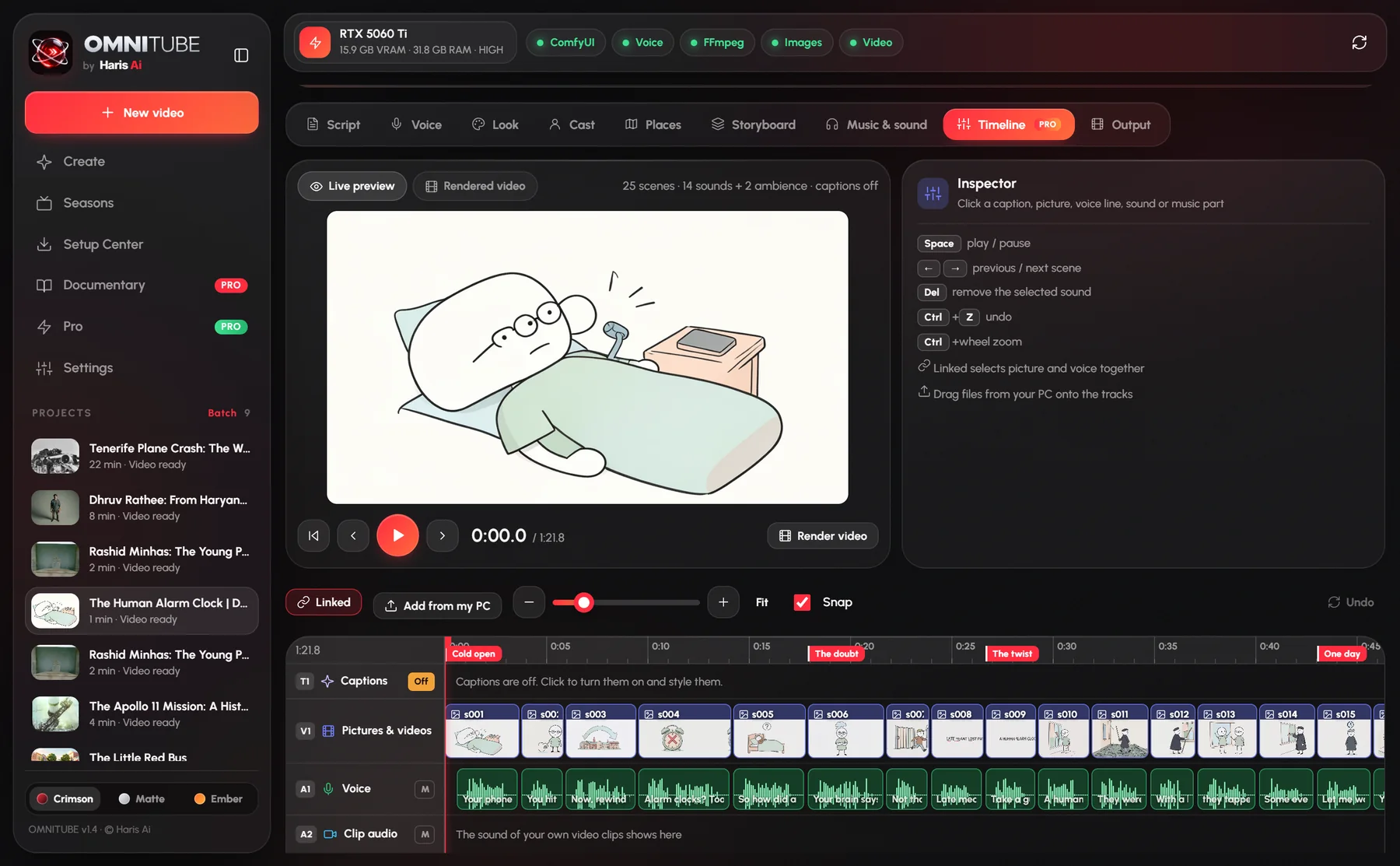
- Live preview: watch the pictures, voice, sound effects, music and captions together before you render.
- Tracks like Premiere: captions, pictures and videos, voice, clip audio, sound effects and music, each on its own track, with mute and zoom.
- Drag to edit: drag the end of a picture for a longer pause, drag sounds to move them, undo with Ctrl+Z.
- Edit the words: change a spoken line (only that line is recorded again) or just its captions, and style the captions on the timeline.
- Add from your PC: drop pictures, video clips, sounds and music on the tracks. Your clip keeps its own sound, linked or unlinked.
Pro cloud mode
- On my PC or Cloud for characters, places, pictures, video clips, voice and music, picked page by page.
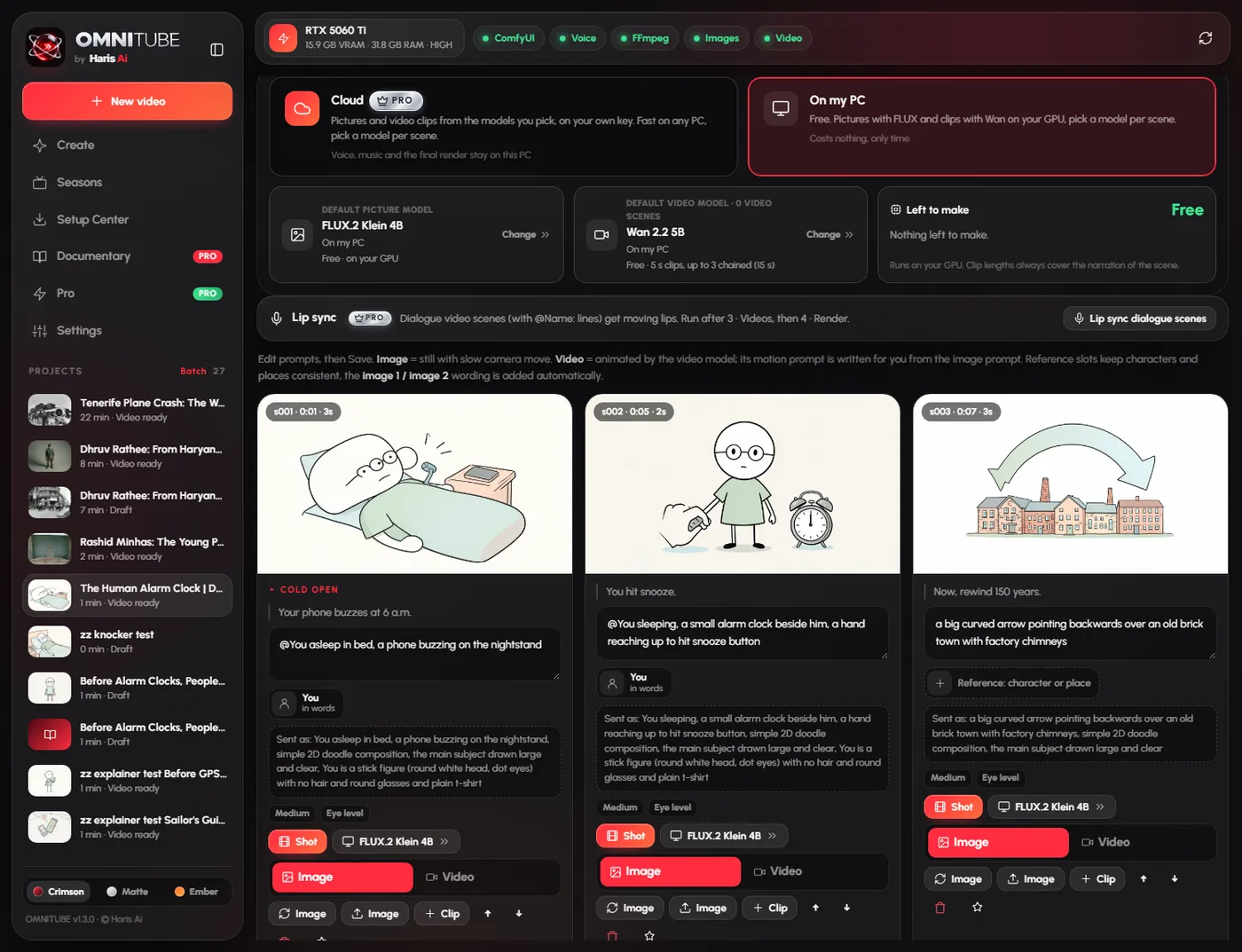
- Pick the model for every scene: Nano Banana, GPT Image, FLUX, Kling, Veo, Seedance, Wan and more, with the price shown before you build.
- Cloud music: Google Lyria and ElevenLabs Music. Cloud voices: Gemini, ElevenLabs and OpenAI.
Free on your PC
- Choose FLUX Klein or Schnell and Wan 5B or 14B per scene, and chain up to 3 clips for longer shots.
- 3 suggested voices for every character, with a voice picker you can listen to.
Setup and smaller PCs
- Setup Center in two parts: Free (everything on your PC) and Pro (only the basics, about 3.5 GB, any graphics card). Pro can still install the free models.
- 4 GB graphics cards now make pictures and short video on the PC, with a low-memory mode for cards under 8 GB.
Fixes
- Characters named in the script always reach the Cast page.
- No more flicker or white line on the Storyboard card.
OMNITUBE 1.3
The first look at the Documentary Studio, the main feature of OMNITUBE Pro. Pro is in private testing and not on sale yet.
Documentary Studio (Pro, in testing)
- From a topic: OMNITUBE researches it, checks every fact against several sources, finds free-to-use photos, maps and clips, and writes the script.
- From your folder: point it at your own photos, clips and notes and it finds the story and builds the documentary.
- 21 channel styles inspired by the best documentary channels, each with its own motion graphics, colour grade, pacing and sound.
Editing
- Pick a style by eye: every style shows a real preview frame, and its signature graphic when you hover it.
- Timeline tab: check and fix every cut, graphic and sound effect before the final render.
- Premiere Pro and CapCut: export the documentary as an editable project to finish it in your own editor.
Pro page
- The Pro page shows this PC's ID, so testers can get a Pro key for their own PC.
Fixes
- Full-screen graphics such as chapter cards now always appear in the video.
OMNITUBE 1.2
Two new kinds of video, 34 styles, and characters and places that finally stay the same.
New kinds of video
- Rhyme mode: write the lyrics (or let the AI write them), pick a music style and a singer, and get a sung kids video with karaoke captions that follow the singing.
- Doodle explainers: a new hand-drawn Stick look, a new picture every 2 seconds with hard cuts, text cards drawn on paper, and an AI writer for the popular explainer formula.
Look
- 34 image styles in 6 groups: Anime, 3D, Cartoon, Realistic, Horror and Art, each with its own preview.
- 13 redesigned caption styles (Viral, Highlight pill, Punch, Karaoke, Netflix box, Documentary, Neon, Horror and more), previewed on a real picture.
- Auto color grade that follows the story: cold for horror, warm for bedtime, clean for flat styles.
Consistency
- Places: a scene sheet keeps the kitchen, classroom or street the same in every scene. A room also gets an outside view of its building.
- Characters: full-body reference sheet (front, side, back), no more double characters, and three characters in one picture stay consistent.
- Auto tags: every storyboard scene shows who is in it and which place it uses.
- Talking buses, cars and animals stay buses, cars and animals. In Stick, chibi and clay styles every person follows the style.
Sound, setup and fixes
- Sound effects by mood (Calm, Kids, Story, Documentary, Horror, Epic, Shorts, Fun) with 8 new sounds.
- Model Doctor in Setup Center finds a broken FLUX or Wan file and downloads a clean copy.
- Auto Director on by default, character sheets save by themselves, season episodes share places and characters.
- Fixed: older NVIDIA drivers no longer stop the voice, and regenerating a picture no longer jumps to the top.
OMNITUBE 1.1
Captions, sound effects, trailers and a setup that does everything for you.
New features
- Captions in 5 styles (Classic, Karaoke, Boxed, Bold Pop, Cinematic), fully customizable, on or off.
- Sound effects placed automatically from the story, free for YouTube.
- Episode trailers for Season mode, in 16:9 and 9:16.
- Stock footage and online voices (Pexels, Pixabay, Microsoft Edge) for PCs without NVIDIA.
- Batch import of up to 200 scripts, built overnight.
Setup and reliability
- System check: tells you if your PC is ready, Limited or not supported.
- Auto setup downloads exactly what fits your PC and resumes after an internet drop.
- Resume a stopped build from the last finished scene, and Preview first before the long build.
- No more black window: setup and errors show inside OMNITUBE. Repair button and one-click error report.
- Fixed: long builds stopping after about an hour. Build time estimate and a sound when the video is ready.
OMNITUBE 1.0
FIRST RELEASEThe first public version: paste a script, get a finished YouTube video on your own PC.
Make the video
- One click, full video: voice, images, video clips, music, render and YouTube text with live progress.
- Natural narration and voice cloning from a short sample; characters can speak in their own voices.
- Season mode keeps the same characters across a whole series.
- Real motion with Wan 2.2 video clips.
Publish it
- Vertical Shorts with fast cuts and word-by-word captions.
- Thumbnails and titles: three thumbnail styles, three title ideas, description, chapters, tags and subtitles.
- Dubbing in 18 languages in your narrator's voice.
- Music made on your PC, and updates in one click.
From install to first video
Install OMNITUBE
Run the installer. The first start prepares its engine in a few minutes, with its own progress window.
Auto setup
OMNITUBE checks your PC and downloads exactly what fits it: AI models, ComfyUI, FFmpeg and Windows essentials, with progress for each item.
Paste a script, build
Pick a video type and a look, paste your script and press Make my video. The finished video lands in your folder.
Same app, more power
Pro is the same OMNITUBE, made in the cloud on your own API keys, so it runs on any laptop. You pay the AI providers directly (usually $0.50 to $2 per video), nothing extra to us. Free stays free, with no watermark and no limits.
Timeline editor
Edit your video like in Premiere, right inside OMNITUBE.
- Live preview: pictures, voice, sounds, music and captions play together, no render needed.
- Every part on its own track: captions, pictures and videos, voice, clip audio, sound effects and music.
- Drag, trim and fix: longer pauses, moved sounds, new words, styled captions, undo.
- Your own files: drop pictures, clips, sounds and music from your PC onto the timeline.
- Cloud mode: pick the best model for every scene and see the price before you build.
21 channel styles
Business, true crime, history, war, space, science, internet culture, engineering and more. Each with its own fonts, background, frames, colour grade and pacing. Pick one by its preview.
Motion graphics
Name labels, years and numbers that count up, newspaper clippings, social posts, timelines, evidence boards, HUD callouts, spec panels, maps and chapter cards, placed from the script.
Editing like a pro channel
A cut every 2 to 3 seconds (faster at the start), push-ins and pans with speed ramps, transitions, music ducking and sound effects on every graphic.
Documentary Studio
A full documentary from a topic or your own folder: real research, fact check, free-to-use archive media and 21 channel styles with motion graphics.
Premiere Pro and CapCut
Export the whole documentary as an editable project: voice, music, sound effects, graphics with transparency and every move as keyframes.
One-click cloud (OpenRouter)
One account for script AI, research with live web search, cloud images and cloud video. Add credit once, pay only for what you make.
Cloud video and images
Kling, Veo 3.1 and Seedance video, Nano Banana, Seedream, FLUX and GPT Image pictures through your own keys. Works without an NVIDIA card.
Script AI
OpenAI, Claude, Gemini, OpenRouter, Groq, DeepSeek or Grok for scripts, titles, directing and translations.
ElevenLabs voices
Premium voices, your own cloned voice from a sample, and an AI sound effect for every scene.
Lip sync and multi-GPU
Characters move their lips to the dialogue. Video clips on every NVIDIA card in the PC at the same time.
Publish and automate
Upload to YouTube, TikTok and Instagram on a schedule. A local API for n8n, Make and Zapier, and a cost estimator before you start.
4K export
A sharpened 3840x2160 master for YouTube.
Pre-order OMNITUBE Pro while the 30 founder spots last. Follow @theharisai or join the Discord to hear first when it opens.
What your PC needs
OMNITUBE checks your hardware and tunes its settings for it automatically.
Questions
Is OMNITUBE really free?
Yes. There is no watermark, no subscription and no limit on minutes or videos. It runs on your own computer, so making more videos costs nothing extra.
Windows says "Windows protected your PC". Is it safe?
That message appears for new apps that are not yet widely downloaded. Click "More info", then "Run anyway". OMNITUBE installs only into the folder you choose.
"Smart App Control blocked an app" or "Error 4551". What do I do?
Smart App Control is a Windows 11 setting that blocks every new app that is not yet code-signed, including OMNITUBE. A signed version is on the way. Until then:
- Open Windows Security (search it in the Start menu).
- Go to App & browser control, then Smart App Control settings.
- Choose Off, then run the OMNITUBE installer again.
On Windows 11 with the April 2026 update or newer you can switch Smart App Control back on later from the same page. On older versions, turning it off is permanent until Windows is reinstalled, so only do it if you are comfortable with that.
I already have OMNITUBE. How do I get the new version?
Open OMNITUBE and click the update button in the top bar. It downloads the new version and restarts in a few seconds. Your projects, voices and models stay as they are. You can also download the new installer here and install it into the same folder. See What's new for every version.
Does it need the internet?
Only for the first setup (downloading the AI models) and for updates. After that, videos are made fully offline.
Do I own the videos?
Yes. Your scripts and videos never leave your PC. The included models use open licenses (Apache 2.0 and MIT). Follow YouTube's rules: add your own creativity and mark realistic AI content as altered or synthetic when YouTube asks.
I have an AMD or Intel graphics card.
OMNITUBE runs in Limited mode: voices, scripts, captions, music, sound effects, stock footage and editing all work. AI images and video clips on your own PC need an NVIDIA RTX card. OMNITUBE Pro makes them with cloud AI on any PC.
My antivirus flags OMNITUBE (for example Avast "IDP.Generic").
That is a false positive: the app is new and not code-signed yet, and some antivirus tools flag every new unsigned program. Add the OMNITUBE folder as an exception, or restore the file from the antivirus quarantine. A signed version is on the way.
A build stopped with an error. Do I start again?
No. Click Resume: finished voices, images and clips are kept and OMNITUBE continues from where it stopped.
Something is not working. How do I get help?
Open Setup Center and click Repair OMNITUBE, it fixes most problems. Still stuck? Click Create error report in the same place and send the file from your Desktop to @theharisai.
What is OMNITUBE Pro? Is it paid?
Pro is an optional paid upgrade, in private testing now. It is the same app with extra power: the Documentary Studio with 21 channel styles, Premiere Pro and CapCut export, cloud AI video and images with your own API keys, ElevenLabs voices, lip sync, multi-GPU and auto publishing. The price will be announced on @theharisai. The free version stays free, with no watermark and no limits.
Make your first video today
Install it, click Auto setup, paste a script.
Download OMNITUBE